
ZESA Token Viewer
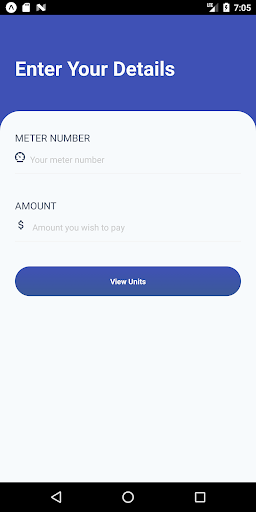
**ZESA - ZETDC Application**Bringing convenience to the palm of your hands.- Open the application and enter your ZESA meter number.- Enter the amount you wish to pay for tokens (optional)The application shows you your current electricity usage for a month and the usage band.- Green 0-50 Kwh (Light use)- Orange 51-200 Kwh (Average use)- Red 200+ Kwh (Heavy use)If you entered the amount the system calculates exactly how many units you will get depending on you current usage.**The Best For Last**Ever bought a token and the money goes through but no token number is sent back.
We got you !!In most cases the token number will have been generated for your account but just not sent you.
You can just click View Token History and twaaaaabaaaaam there is a list of your most recent token numbers purchased.
We got you !!In most cases the token number will have been generated for your account but just not sent you.
You can just click View Token History and twaaaaabaaaaam there is a list of your most recent token numbers purchased.
Features
💰
Financial Tools
Manage your finances and track your expenses easily.
Screenshots
See ZESA Token Viewer in Action

Get the App Today

Available for Android 8.0 and above
Ask AI about this app
Get instant answers about features, tips and more from popular AI assistants.